FEATURES
• Upload or download multiple files at once
• Delete, rename, copy, zip or unzip files
• Password authentication (optional)
• Shortcuts to photo, video and music directories
• Runs as a background service
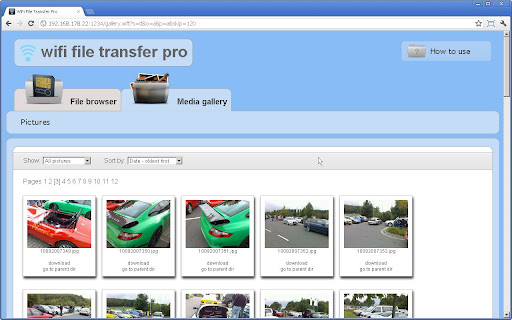
• View photos directly in your web browser
NOTE
• In order to use this app, your computer and your phone need to be on the same local area network.
• If you would like to use this app on public WiFi networks, please make sure to set an access password in the app settings.
ADVANTAGES OVER THE FREE VERSION
• This paid version allows you to upload files of any size while the free version is limited to 4 MB per file.
What's in this version:
Version 1.0.3:
-Minor bug fix
Requirements: for Android 2.1 and up
Overview: WiFi File Transfer is a light-weight web server that lets you upload and download files to/from your phone over a wireless connection. Transfer files without a USB cable.
Highlights:
* Dual-pane tree view
* Root, FTP, SMB, Sqlite, Picasa, Zip, Rar explorer
* Cloud storage access: Google Drive™, Dropbox, SugarSync, Box.net, SkyDrive
* Favorite folders
* Built-in viewers for images, video, audio, text
* Hex viewer
* Fast Image viewer with zoom and slide to previous/next images in folder
* Thumbnails for images and video as well as for various file types (depending on associated application)
* Multi-selection - always available, yet not disturbing
* View APK files as ZIP
* Share - send files by Bluetooth, email, or whatever the device supports, from any location
* Configurable buttons and key shortcuts
* Seamless work with Zip (as if it was normal folder)
X-plore allows you to see inside of your Android phone or tablet.
This is a dual-pane explorer, which means that there're two folders shown at same time, and common operation such as copying files are done from one pane to another.
And X-plore shows folder hierarchy in a tree view. This offers clear orientation on where in file system you currently are, and fast switching to other location.
Currently selected folder and files are highlighed, while other folders/files have slighly darker background.
You may explore internals of the device, and if you're power user and have your device rooted, you can make changes to system data - backup files, remove unwanted applications, etc.
If you're standard user, you may choose to hide internal memory from view and be sure not to mess with system.
You can comfortably see contents of your external memories, either be it built-in high capacity memory, external memory card, or possibly USB memory stick attached to your tablet. All these memory types are listed in main level, you don't need to search for their folders on the device.
Access to FTP and FTPS (secure FTP) servers is supported.
Multiple servers may be configured. All standard file operations can be done on FTP server.
X-plore can display shared folders on other computers in LAN (local area network).
The system allows access to shared folders on computers connected to LAN, or even remote server if it supports SMB protocol.
X-plore can access various web storage "Cloud" servers, and access their files.
You need to have account in supported web service, then you can access your files stored online through X-plore.
Main operations are related to managing files and folders - viewing, copying, moving, deleting, compressing to Zip, extracting, renaming, sharing, and more.
Picasa albums
X-plore can list images in Picasa albums, download them, create albums, upload and delete photos, edit captions.
SQLite database viewer
X-plore can show SQLite database files (those with .db extension) as expandable list of tables, each table containing list of rows and columns with database entries.
Main interaction is done by touch screen, clicking on folders or files to open files, or long-click to open context menu which contains options which can be done on particular clicked item, or multiple selected items.
Multi-selection allows to do operation on more files at once. Files can be selected by clicking check box. It is also possible to select all files in a folder, or clear selection, by clicking parent folder's check box.
Opening file may mean to use one of built-in viewer for most popular file types: images, audio, video and text.
Or you may configure X-plore to use system application for opening files, in which case system-predefined application that can open particular file is launched.
Archives (currently supported are Zip and Rar) are displayed as other folders. You may open them, see contents, and do standard operations that you'd do on files - rename, delete, copy from/to, etc.
Additional interaction is possible by button bar, which is between two panes, and is fully configurable. You may put buttons of your desired operations here, and change ordering.
What's in this version:
✔ Fixes in News
✔ Audio player: automatic mute at phone call
✔ Vibration configuration option
✔ Hiding folders now manages .nomedia system file, which should hide folders also in Media Gallery
Requirements: Android OS 2.1+
Overview: X-plore is dual-pane file manager with tree view, LAN/FTP/Root/Clouds and more.
If you have ever tried to visit a forum using an Internet browser on your Android device you know what a nightmare it can be. The multitude of layouts you will encounter can have you scrolling, pinching, zooming, and swiping until your fingers are numb. Enter the Tapatalk Forum App.
Tapatalk houses over 35,000 of the most popular public forums right inside the app. From online games to technology, animals to extreme couponing, there is a forum out there to suit your interests. Browse the 13 categories or search for a particular forum in Tapatalk's easy-to-use interface. You can find anything and everything with this app.
Once you have found the forums you want to read it is easy to add them to your favorites for quicker access. Then you simply log in to the app and read your private messages or reply to current topics. You can also easily start a thread about something that piques your interest. You can also mark the topics you care about on your forums.
Tapatalk contains all the features and capabilities found in your favorite browser but in a simple, straight-forward delivery. Easily see who is online, view board statistics, and even user profiles all without waiting for your phone's browser to connect to the Internet. Give it a try today.
What's in this version:
version 2.2.2:
- Major image loading improvement
- New image gallery
- Background attachment download
- Less crashes
- Improved Android 4.1 support
version 2.1.3:
- Notification bandwidth usage issues
- Improved memory management
- Other bug fixes
version 2.1.1:
- Advanced search support
- Bug fixes
If you have any reproducible issue please report it at our support forum. Search for "Tapatalk" in our app, register an account and post your issue. We will fix it for you.
Requirements: Android OS 2.0 +
Overview: The only and the best fully functional forum app in the Market, endorsed by over 35,000 of forums worldwide. 4.5/5 stars reviewed by ten thousands of power fellows. Why not give it a try?
Notice!!!
The lastest version has been mistaken for malware by 'Avast! Mobile Security'.
We promise there is no Trojans in GO Locker.
And we are trying to communicate with 'Avast!' to fix this problem.
Users can enjoy GO Locker as usual without unsafe factors.Thanks!
GO Dev Team
Big News!!! GO Locker Theme Template has released!
Now you can try to make your own GO Locker theme and share to others.
Click:
http://golauncher.goforandroid.com/2012 ... -released/
to know more!
Notice! Here comes the version of GO Locker.
====Features:
1. Cool Locker Screen that makes your phone outstanding;
2. Good compatibility with GO Launcher EX and it is stable;
3. Easy to use;
4. Able to activate phone, SMS and Camera directly or you can change the slider shortcuts yourself;
5. Various of Locker Themes to match your style;
6. Support customise wallpaper;
7. Security locker;
8. Emergency unlock enabled;
====Tips:
1. Make sure GO Launcher EX V2.58 or above has been installed;
2. Click “MENU—-Preferences—-Theme Settings—-GO Locker” to use it after installed;
3. Click “My locker” to preview and Download more Locker themes;
Please let me know if you meet any bugs or want any improvement!
E-mail: golauncher@goforandroid.com
Recent changes:
V1.31
1. (New) Slide answer callings (GO locker–>settings–>Slide answer incoming calls)
Beta function, if you can’t answer incoming calls, please stop it.
2. (Improve) Music controller settings
3. (Improve) Full screen lock
Notice!!!
The lastest version may be mistaken for malware by ‘Avast! Mobile Security’.
We promise there is no Trojans in GO Locker.
We are trying to communicate with ‘Avast!’ to fix this problem.
GO Dev Team
Requirements: Android v2.1+
Overview: GO Locker,design to GO Launcher EX is the most simple locker for Android!
Elegant photo contact dialer!
xPhone provides an incredibly user-friendly interface for quick and effective management of your photo contacts.
Features:
• Organize your favorite contacts into groups
• Quickly navigate to a group by swiping your finger
• Tap on bottom group indicator to hand pick a group
• Tap on any contact to execute assigned action
• Long tap to view full contact's details
• Call, send message, locate address, browse website, ...
• Launch Contacts or Phonepad by shortcuts
• Customize your wallpaper and avatars
• And much more...
If you have comments or feedback on our app, please send to support@pixelrush.net as there's no way to reply to comments in the Android Market. Thanks! PixelRush Team
What's in this version:
• Added: ICS and JB compatibility
• Fixed: Quick launch icon
• Fixed: Clear missed call notifications
• Fixed: Date of events
• Minor fixes and improvements
Requirements: Android 2.1 and up
Overview: Elegant photo contact dialer!
xPhone provides an incredibly user-friendly interface for quick and effective management of your photo contacts.
Ringtone Maker for Android™ using your MP3's and more!
☆☆ 50% OFF for a limited-time! Thank you for making our App so popular. ☆☆
Make unlimited free ringtones with the music on your Android™ device. Advanced ringtone making options included! Based on technology from our award-winning web service (http://mobile17.com), you’ll choose from both popular edits generated by users online and options to “drag’n’drop” fine-tuned editing controls for making your own ringtones in just seconds!
We offer the best ringtone maker in the Android market.
Features:
- Create unlimited ringtones, custom lengths... up to 40-seconds!
- Make "text tones" of 6 seconds or less, using our same App!
- NO ADVERTISEMENTS.
- Supports popular audio-formats (MP3, M4A)
- Fine-tuning buttons (+/-)
- Suggested ringtone entry points from our website
- Ringtones may also be used for alarm clocks & contacts
- Installs ringtones automatically!
To make a ringtone: 1) Open the 'Ringtone Maker' App. 2) Choose a song from your device’s ‘Music’ Library. 3) Use the ‘slider control’ and ‘fine-tuning buttons’ to create the ringtone of your liking! -- Instant previewing and unlimited, high-quality ringtone conversions are built-in.
KW: ringtone maker, make ringtones, create unlimited ringtones, music ringtone maker, ring tones for free, mobile, 17, pro, creator, editor, your, own
What's in this version:
- Twitter and Facebook sharing capabilities!
- Fine-tuning options automatically restart ringtone playback when editing!
- No editing restrictions! Up to 40 Seconds, unlike those other Apps.
- New language translations.
- Small updates and bug fixes.
Requirements: ANdroid 1.6 and up
Overview: Ringtone Maker for Android™ using your MP3's and more!
Atom Launcher, state of the art launcher for Android’s new OS; ICS, is now on market
5 Million download, SSKIN - now introduce you our new launcher for ICS
Experience new optimized ICS launcher if you have ICS version android phone
*** Features
- High quality : Launcher for Ice Cream Sandwich (from Android ICS 4.0.2)
- Light & Easy : Offers Select Options by light and easy launcher
- Stylish : Stylish UI with backgrounds, icons, and points colors
- Smart : Optimized themes for ICS, Automatically supporting existing launcher such as SSKIN and Go Launcher
- Fun: Offers fun-interactive themes by various backgrounds, live backgrounds and ICS’s widgets
*** Atom Launcher Spec.
- Supports for ICS’s widgets and menu: Widgets located on upper side of screen (search bar or clock)
- Available for Changing Display Settings on Hidden Dock: Emotional Filter Effect, Various Screen Switching, Opacity Adjustment
- Available for Changes by Setting Point Color Changes: Available for Color Changes for widgets, Menu, Guide, or icons
- Live Background: Changes to dull backgrounds with dynamic backgrounds
- Wide-Range Theme Support: Wide-range theme support by Atom Launcher and also existing SSKIN and GO Launcher themes
*** Attention
- Available from above Android OS 4.0.2 version
- The application needs 10 MB in total to save theme resources.
- Because of enhancing usability, installed theme doesn’t appear
- Not Available for Tab Device (X-large screen)
- Upgrade Info
+ What's new in version 0.5.1
- fixed the bugs in Atom menu bar on upper screen
- fixed the Massage Icon error in Gallaxy Note and Gallaxy III
- minor problems fixed
+ What's new in version 0.5.2
- supports Vega racer2 for theme change
- fixed the unchanging icon errors in certain conditones
- fixed the bugs in dispearing icons on dock bar
+ What's new in version 0.5.3
- Possible to apply Gallexy SG III theme icons
- Supports for icon use from one's default setting
- Added Gallexy S III's home setting in home setting options
*** Customer Support
Please leave reviews or comments on Google play reviews
Your review will be appreciated.
For more information or support, please visit
- Facebook: http://www.facebook.com/atom.home
- CS E-mail: atom.launcher@dlto.co.kr
What's in this version:
For now, version 0.5.3 is the lastest. We will continue to offer updates. Keep it upgraded and enjoy better smartphone interface.
Requirements: Android 4.0 and up
Overview: Light and Easy!!